Support
Answers to common questions, plus what's covered in the in-app guide.
Frequently Asked Questions
Location
Why is the clock asking for my location?
Sloww uses your location to calculate sunrise, sunset, twilight, and moon times for where you are. Your location stays on your device and is never sent to a server. You can deny access and set a location manually instead.
How do I change my location?
Long-press the location label below the clock to open the location picker. Search for any city, enter exact coordinates, or switch back to device GPS. You can bookmark locations for quick switching.
Reading the Clock
What do the different rings mean?
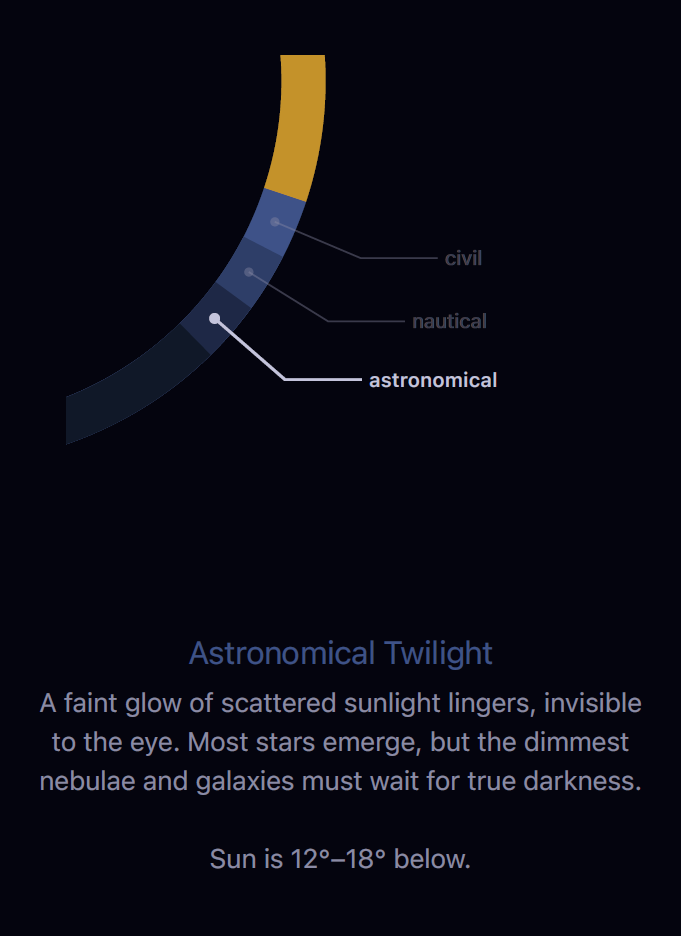
The outer ring shows the sun's arc and daylight. Colored bands around it represent twilight stages and golden hour. Inside that, the moon ring shows when the moon is above the horizon. The two innermost rings track the lunar cycle and the seasons of the year. There's also an optional breath ring for guided breathing. The in-app guide covers each ring in detail.
Why does the clock look different for some locations?
Near the poles, the sun behaves differently — midnight sun, polar night, white nights, and perpetual twilight are all real phenomena. The clock adapts to show these accurately. The "Extreme Latitudes" section of the in-app guide explains each one.
Customization
How do I show or hide rings?
Use the toggle buttons at the bottom of the clock. Each button cycles through states for its ring — tap to step through the options. Dots below each button show the current state.
What is the breath ring?
A breathing guide at the center of the clock. Choose from four techniques: box breathing, coherent breathing, 4-7-8 relaxation, and extended exhale. Each visualized as a pulsing ring. Cycle through them with the wind icon on the toggle bar.
How does time travel work?
Long-press the time display to activate a scrub slider. Drag to move through the day and watch the clock update in real time. Tap the handle to switch between slow mode (minutes) and fast mode (hours to days).
Widgets
Can I add widgets to my Home Screen or Lock Screen?
Yes. Sloww offers Home Screen widgets in three sizes and five Lock Screen widgets showing sun, moon, and daylight data at a glance. Long-press your Home Screen, tap the + button, and search for Sloww.
Privacy
Does Sloww collect any data?
No. There are no analytics, no crash reporters, no ad frameworks, and no network requests. Everything is computed and stored on your device. See the Privacy Policy for details.
In-App Guide
Sloww includes a built-in guide with illustrated articles on every feature. Open it by tapping the guide icon in the app. Here's what it covers:
The Clock
Using Sloww
Going Deeper
Still need help?
Reach out at support@hiiden.co and I'll get back to you as soon as I can.